How to Automate Blog Interlinking Strategy: AI-Powered SEO Guide 2025
Managing internal links manually across hundreds of blog posts? You’re probably missing 82% of linking opportunities and wasting hours you could spend on strategy. But here’s the good news: automating your blog interlinking strategy isn’t just possible—it’s become one of the smartest moves you can make for scalable SEO in 2025.
We’re seeing websites boost organic traffic by 40% simply by nailing their internal linking game. The secret? They’re not doing it manually anymore. They’re using AI-powered automation to connect content, distribute link equity, and guide both readers and search engines through their site like pros. And you can too.
In this guide, we’ll walk you through exactly how to automate your blog interlinking strategy without losing control or creating a spammy mess. Whether you’re running a small blog or managing an enterprise site with thousands of pages, you’ll find actionable tactics that work.
Why Internal Linking for SEO Matters (And Why Manual Sucks)
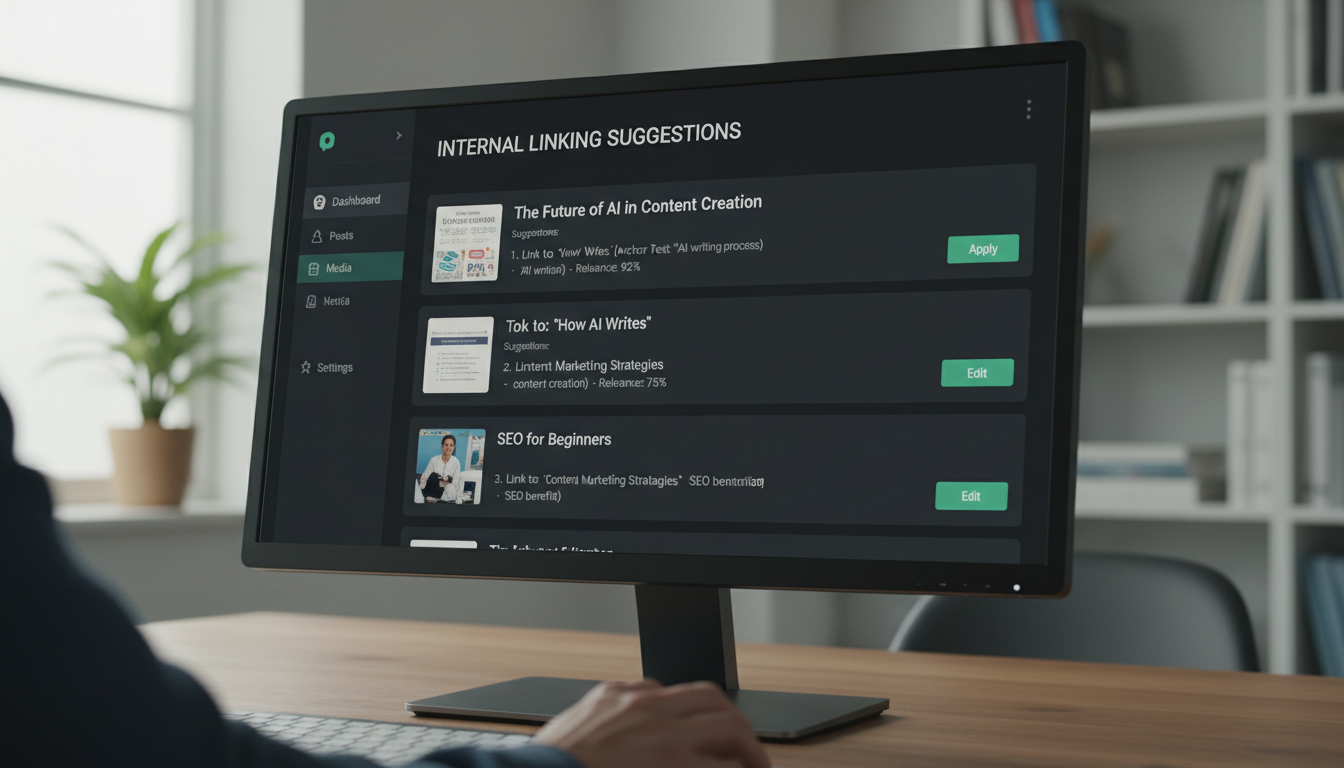
Internal linking is one of those underrated SEO strategies that quietly does the heavy lifting for your website. It’s about connecting pages, but also about helping search engines and users better understand your site. When done correctly, internal links can enhance crawlability, improve your search engine rankings, and boost your topical authority.
Think about it: every internal link tells Google which pages matter most on your site. Internal links connect your content and give Google an idea of the structure of your website. The more links an important page receives, the more important it will seem to search engines.
But here’s where most bloggers get stuck. Manually adding internal links means:
- Opening old posts every time you publish something new
- Hunting through archives to find relevant content
- Guessing which anchor text to use
- Missing connections between related topics
- Spending hours on repetitive tasks instead of creating content
According to inLinks, site owners miss 82% of internal linking opportunities. That’s a massive gap. When you automate, you don’t just save time—you catch opportunities that your brain would never spot manually.
At Hiland SEO, we’ve seen clients transform their organic traffic by switching from manual to automated internal linking. The difference isn’t just efficiency—it’s results.
What Does Automated Internal Linking Actually Mean?
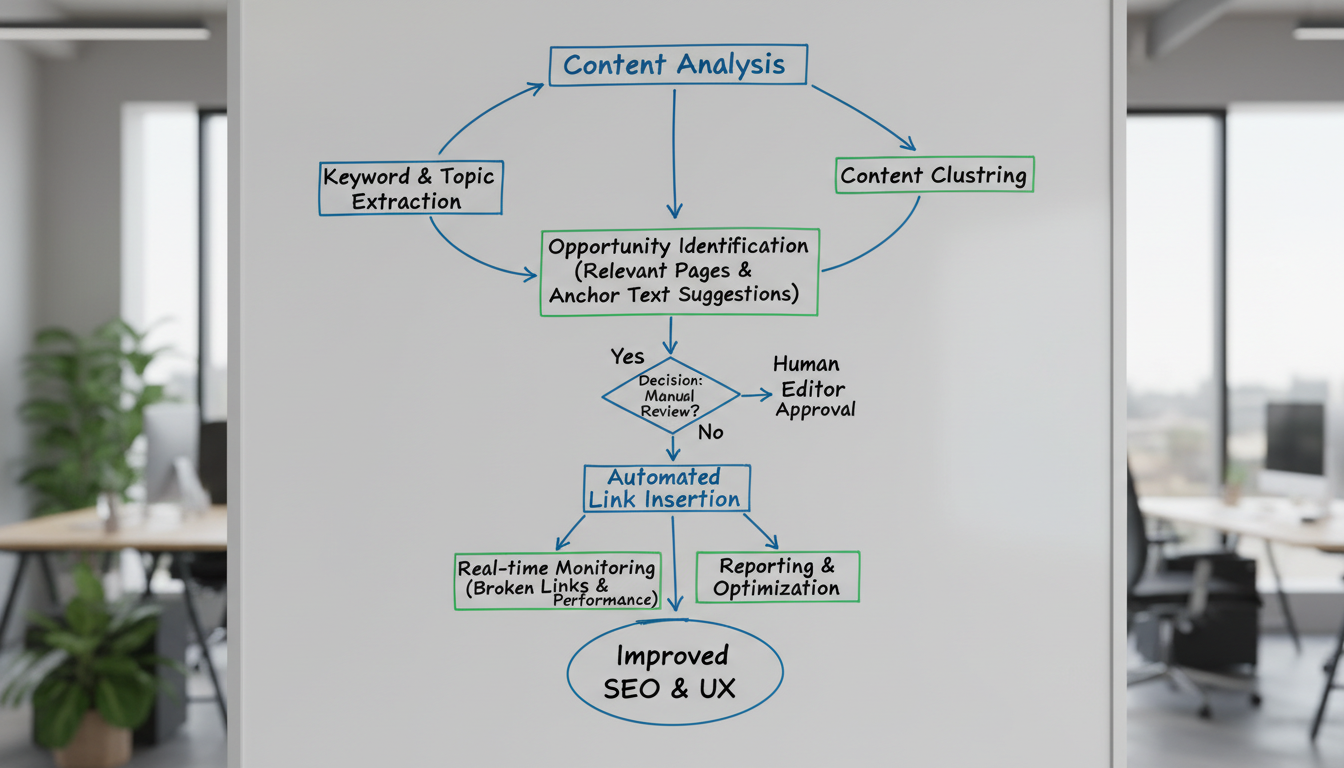
Automated internal linking refers to the use of artificial intelligence (AI) and application programming interfaces (APIs) to dynamically create links between related content within a website. AI algorithms analyze content contextually, understanding the relationships and topics discussed across various pages. By leveraging natural language processing (NLP) and machine learning, these systems can intelligently determine which pages should link to each other, enhancing the site’s SEO and user navigation.
Basically, instead of manually inserting every single link, you use software that:
- Scans your content to understand what each page is about
- Finds relationships between related posts using semantic analysis
- Suggests or inserts links with relevant anchor text
- Updates automatically when you publish new content
Automating internal linking involves leveraging AI-powered tools and algorithms to streamline the process of creating, managing, and optimizing internal links within a website. The best part? You stay in control. Most tools let you review suggestions before they go live, or you can set rules and let the system run on autopilot.
Benefits of Automating Your Blog Interlinking Strategy
Why should you bother automating? Let’s break down the real benefits:
Time Savings That Actually Matter
Teams spend several hours a week combing through archives, hunting for anchor text, and double-checking links. Automating that grunt work frees you to plan new content and strategy while still reaping the rewards: stronger topical authority, smoother user journeys, and fewer orphan pages.
Instead of wasting 5-10 hours per week on manual linking, you can focus on writing killer content, building backlinks, or refining your SEO solutions.
Improved SEO Performance at Scale
The primary benefit is a massive gain in efficiency, freeing up SEO and content teams from tedious manual work to focus on higher-level strategy. Scalability is another critical advantage; as a site grows, an automated internal linking system can effortlessly keep pace, ensuring new content is immediately integrated into the site’s architecture. From an SEO perspective, these tools are vital for optimizing crawl budget by guiding search engine bots to the most important pages. They also ensure the strategic distribution of link equity, boosting the authority and ranking potential of key commercial or informational pages.
Better User Experience
Through automation, websites can create a seamless flow between pages, allowing visitors to effortlessly discover relevant content. This interconnected setup not only enhances user engagement but also helps build a cohesive site architecture that search engines can easily interpret.
When readers find exactly what they need through smart internal links, they stick around longer, explore more pages, and trust your content more.
Consistency and Accuracy
The process of inserting internal links can be time-consuming, but with the advent of automated tools, this task becomes much more manageable. Automation allows for the quick identification of suitable anchor text within your content, suggesting the most relevant internal links. This not only saves time for SEOs but also enhances the consistency and accuracy of linking, which is critical for search engines and improving the overall user experience.
No more forgetting to link new posts. No more inconsistent anchor text. The system handles it all based on the rules you set.
How to Automate Blog Interlinking: Step-by-Step Strategy
Ready to automate? Here’s your roadmap:
Step 1: Define Linking Priorities
Determine which pages on your website are the most valuable in terms of SEO and user experience. These high-priority pages should be the primary targets for automated internal linking efforts.
Make a list:
– Cornerstone content (your best, most comprehensive posts)
– High-converting pages
– Posts that already rank well
– New content that needs a boost
Your automation should prioritize linking TO these pages from relevant content across your site.
Step 2: Choose the Right Automation Tool
Automated internal linking tools are transforming the way websites manage SEO, especially as content volume grows and needs to be managed at scale. Instead of spending hours manually implementing internal links best practices, these tools scan your content, suggest relevant connections, and optimize anchor text with just a few clicks. However, not every tool offers the same experience; some focus on ease of use, while others provide advanced controls or bulk linking features.
Popular options include:
– Link Whisper (WordPress plugin with AI suggestions)
– Internal Link Juicer (WordPress automation)
– Search Atlas OTTO SEO (comprehensive SEO suite with automated linking)
– Rank Math (SEO plugin with internal linking features)
– AutoLinking.ai (semantic analysis for WordPress)
– Surfer SEO (content optimization with internal linking)
Look for AI-powered tools that allow you to control the depth of your links, suggest relevant internal links as you build content, and adapt to the structure of your site as it grows. Finally, ensure you can track performance. Monitoring which links get clicked and where traffic flows help you refine your strategy and enhance the visibility of important content over time.
Step 3: Set Up Your Automation Rules
Most tools let you configure:
– Maximum links per page (usually 5-10 is sweet spot)
– Anchor text preferences (exact match vs. natural variations)
– Excluded pages (contact forms, legal pages, etc.)
– Linking direction (new to old, pillar to cluster, etc.)
Additionally, Verbolia allows you to set multiple rules, enabling manual selection of links on certain pages or configuring exceptions where necessary. This level of customization ensures that your internal linking strategy is finely tuned to your site’s unique content and structure, enhancing both SEO performance and user experience.
Step 4: Optimize Anchor Text
Ensure that the automated internal linking tool uses relevant, keyword-rich anchor text when creating links. Avoid generic phrases like “click here” and instead use descriptive text that accurately reflects the content of the linked page.
Best practices for automated anchor text:
| Anchor Text Type | Example | Use Case |
|---|---|---|
| Exact Match | “automated internal linking” | Sparingly, for main keywords |
| Partial Match | “how to automate internal links” | Most common, natural |
| Branded | “Hiland SEO’s linking guide” | When referencing your own resources |
| Generic (avoid) | “click here” | Never use for SEO value |
As a rule of thumb, it’s a good practice to use a variety of anchor texts, especially when they all point to a particular page. This keeps your internal link profile looking natural.
Step 5: Implement and Monitor
Implement and Monitor: finally, apply the changes and continuously monitor their impact. Use tools like Oncrawl and Botify to track improvements in page ranking and depth, and adjust your strategy as needed. By following these steps, you can efficiently automate the internal linking process on your website, addressing issues of page depth and improving the overall SEO performance of your key pages.
Regularly monitor the performance of your automated internal linking strategy using analytics tools. Track key metrics such as organic traffic, search engine rankings, and user engagement. Use these insights to continually refine and optimize your internal linking approach.
Automated Internal Linking: 10 Proven Tactics That Work
Want to take your automation to the next level? Try these tactics:
1. Link New Content to Existing Cornerstone Posts
Leverage AI-powered insights to identify and link high-value pages within your existing content, maximizing your site’s internal linking potential. Matches closely related articles and pages that aren’t currently linked to improve rankings through automated link building.
Every time you publish, your tool should automatically scan for opportunities to link to your best existing content.
2. Update Old Posts with Links to New Content
A good practice after you publish a post or page is to link to that newly published post from other content on your site. Of course, the posts or pages that link to the recently published post must be on a similar topic. You shouldn’t just link to this new post from a random post or page on your site. Now, this might sound daunting, especially if you regularly publish content. But it’s worth the hassle, as you won’t end up with a bunch of orphaned content that needs fixing.
Automation makes this easy. The tool finds old posts that would benefit from linking to your new content.
3. Build Topic Clusters Automatically
To build a scalable strategy, the Topical Map tool helps you think ahead by organizing themes into keyword clusters, giving you a clear internal linking plan as you grow your content.
Group related posts together with a pillar page at the center and cluster content linking back and forth.
4. Fix Orphan Pages
Orphaned pages are also a common problem. These are pages identified as existing by crawlers, from your sitemaps, but which cannot be found by search engines, via internal links. These are therefore pages that will not generate any ranking on search engines. An automatic internal linking solution will allow you to flatten your URL structure so as to make all of your content much more accessible by search engines and therefore more likely to generate SEO.
Your automation tool should flag and fix orphan pages automatically.
5. Distribute Link Equity Strategically
The primary goal of automating internal linking is to facilitate the flow of link equity, or “link juice,” throughout a website. By strategically directing link equity to high-value pages, businesses can improve the search engine rankings of their most important content.
Make sure your automation prioritizes linking FROM high-authority pages TO pages that need a boost.
6. Use Semantic Analysis for Better Relevance
It uses semantic analysis to identify related articles and automatically adds internal links between them by targeting closest related anchor/ rewriting parts of text, which improves user experience and boosts SEO.
The best tools don’t just match keywords—they understand context and meaning.
7. Implement Automatic Link Suggestions in Your Editor
Yoast SEO Premium gives you smart internal linking suggestions right inside the WordPress editor. As you write, it automatically scans your content and recommends related pages you can link to. Just drag and drop them into your post, no more hunting through old articles or opening endless tabs.
This helps you build links naturally as you create content.
8. Set Link Frequency Caps
Having too many links on a page can dilute the value of each link and overwhelm users. Solution: use tools like Google Analytics to identify and remove unclicked links. Maintain a balance in the number of internal links, aiming for a moderate amount that enhances user experience and SEO value.
Don’t go crazy. Keep it natural with 5-10 contextual links per post.
9. Leverage Google Search Console Data
With GSC integration the internal linking tool offers internal linking suggestions based on the impressions and clicks of top performing, contextually relevant pages. This ensures that the link equity is equally distributed and increase in discoverability on the low performing pages.
Connect your automation to GSC to prioritize linking based on real performance data.
10. Review and Refine Regularly
Automation doesn’t mean “set it and forget it.” While invaluable, don’t rely solely on automated internal link builders. Review the links manually and adjust them as needed, ensuring they are relevant, natural, and aligned with your goals. Only when “machine” and “human” collide can you have an excellent tool at your disposal.
Common Mistakes to Avoid When Automating Internal Links
Don’t let automation backfire. Watch out for these traps:
Over-Optimization of Anchor Text
Exact-match anchors refer to anchor texts that use the exact keywords for the destination page. While some might argue that using exact-match anchor text is better, especially for contextually relevant links, they can also potentially backfire on your website. A few exact-match anchor texts are fine, but too much of it can make your anchor profile look spammy.
Variety is key. Mix it up naturally.
Creating Irrelevant Links
Randomly linking to non-related articles within a website can harm SEO as it signals to search engines that the website is not well-organized or well-maintained. It can also lead to poor user experience, high bounce rate, and “link dilution” where the link equity is spread out, resulting in weaker internal linking structure. Properly organized and semantically relevant internal links are crucial for SEO and user experience.
Always prioritize relevance over quantity.
Ignoring Broken Links
OTTO SEO highlighting critical link issues—including broken links, redirects, and internal linking errors—to enhance site structure and boost search performance.
Your automation should flag and fix broken internal links automatically.
Not Tracking Results
If you’re not measuring, you’re just guessing. Track:
– Organic traffic changes
– Page rankings
– User engagement metrics
– Crawl efficiency
Best Tools for Automated Blog Interlinking in 2025
Here’s a quick comparison of top tools:
For WordPress Sites:
– Link Whisper: Best all-around for bloggers and niche sites
– Internal Link Juicer: Great for set-and-forget automation
– Rank Math: Good if you want an all-in-one SEO plugin
– Yoast SEO Premium: Solid suggestions with manual control
For Enterprise & Large Sites:
For enterprises managing thousands or even millions of web pages, manual internal linking is not just inefficient, it’s impossible. At this point a dedicated internal linking tool for enterprises becomes a strategic necessity. These platforms automate the discovery and implementation of contextual links, solving significant enterprise internal linking scaling pain points.
- Quattr: Advanced AI with enterprise features
- Search Atlas OTTO SEO: Comprehensive SEO suite with automation
- SEO.AI: Centralized platform with AI scanning
For Any Platform:
– AutoLinking.ai: Works via XML export for WordPress
– Moonlit Platform: Bulk processing via CSV
– Surfer SEO: Semantic linking with content optimization
Choosing the right tool means finding the optimal mix of features, flexibility, and cost. At Hiland SEO, we help clients choose and implement the right automation tools for their specific needs and scale.
How to Measure Success of Your Automated Interlinking Strategy
Automation is great, but only if it works. Here’s how to measure success:
Key Metrics to Track:
- Organic Traffic Growth: Are more pages getting traffic?
- Rankings for Target Keywords: Are your priority pages climbing?
- Crawl Depth: Are previously deep pages now easier to find?
- Orphan Pages: Are you reducing pages with zero internal links?
- Time on Site: Are visitors exploring more pages?
- Link Click-Through Rates: Which internal links are actually getting clicked?
Internal links help search engines understand what your pages are about, which pages matter most, and how your topics fit together. Automation takes that same intent—surfacing the best connections—and applies consistent rules and data models to scale it across hundreds or thousands of URLs. Done well, internal linking automation identifies link candidates, generates context-appropriate anchors, respects frequency caps, and rolls changes out in controlled releases.
Tools for Monitoring:
– Google Search Console (track indexation and rankings)
– Google Analytics (measure traffic and engagement)
– Screaming Frog (analyze link structure)
– Ahrefs or SEMrush (internal link reports)
– Your automation tool’s built-in analytics
Set up monthly check-ins to review performance and adjust your automation rules as needed.
FAQs
Does automated internal linking hurt SEO if done wrong?
Yes, if you create irrelevant links, over-optimize anchor text, or link too aggressively, it can hurt user experience and look spammy to Google. The key is using quality tools with semantic analysis and reviewing links periodically to ensure relevance.
How many internal links should be on each blog post?
Aim for 5-10 contextual internal links per post, or about one link every 200-300 words for longer content. Quality beats quantity—focus on relevant links that help readers, not just link counts.
Can I fully automate internal linking or do I need manual review?
You can go full autopilot with the right tools and proper configuration, but most experts recommend periodic manual reviews. Start with review-before-publish, then shift to autopilot once you trust your system’s accuracy and relevance.
What’s the ROI of automating blog interlinking strategy?
Websites typically save 5-10 hours per week on manual linking tasks and see 20-40% increases in organic traffic within 3-6 months. The tools pay for themselves quickly through time savings alone, not counting the SEO benefits.
Will automated internal linking work for small blogs under 50 posts?
It can, but the benefits really kick in once you have 100+ posts. With fewer posts, manual linking is manageable and might give you better control. Save automation for when your content library reaches the point where manual becomes impossible.
Automating your blog interlinking strategy isn’t just a time-saver—it’s a game-changer for scalable SEO. You get better results with less effort, catch opportunities you’d miss manually, and build a site structure that both readers and search engines love.
Ready to level up your SEO game? Hiland SEO helps businesses implement automated internal linking strategies that actually move the needle. Let’s build something that scales.