Discovered – Currently Not Indexed: What It Means and How to Fix It
“Discovered – currently not indexed” means Google knows a URL exists but hasn’t crawled it yet. “Crawled – currently not indexed” means Google fetched the page and decided not to add it to the index, at least for now. Both show up in the Page indexing report in Search Console. When many URLs pile up in either status, the cause is often site-wide rather than page-specific.
I run SEO for Shopify and WordPress sites and see these two statuses in almost every audit.
What the two statuses mean, in Google’s words
Google’s Page indexing help page defines “Discovered” as: “The page was found by Google, but not crawled yet.” It adds that Google usually wanted to crawl the URL “but this was expected to overload the site; therefore Google rescheduled the crawl.” That is why the last crawl date in the report is empty.
“Crawled” is the opposite situation. Google visited the page and left it out. The same help page says it “may or may not be indexed in the future; no need to resubmit this URL for crawling.”
| Discovered – currently not indexed | Crawled – currently not indexed | |
|---|---|---|
| Has Google fetched it? | No | Yes |
| Last crawl date | Empty | Shown |
| Usual cause | Low crawl demand or a server that looks overloaded | Quality, duplication or a soft error on the page |
| Where to look first | Server responses, sitemap, internal links | The page itself and its near-duplicates |
Google also says, on that same page, that “Not indexed is not necessarily bad” and that you should not expect every URL to be indexed, only canonical pages. Filter URLs, tag archives and old duplicates belong in this report. Your product, service and article pages don’t.
Why Google leaves pages in these states
The clearest recent explanation came from Google’s own podcast. Asked in Search Off the Record episode 112 (July 2026) whether this is a sign of a quality issue, John Mueller answered “Sometimes,” then said that if Google’s systems “are seriously worried about the quality of a website,” they “will reduce the number of pages that they index.” He added that when “Google is not indexing a lot of your pages and there’s no technical reason,” you “almost need to take a step back and think about the quality overall.”
In the same episode Martin Splitt said there is no meaningful ratio of indexed to non-indexed pages, and Mueller mentioned that only about 5% of Google’s own developer documentation pages are indexed. So a large “not indexed” count on its own proves nothing. What matters is which pages are in it.
Crawl demand ties this together. Google’s crawl budget guide says that “if crawl demand is low, Google will crawl your site less,” even when the server could handle more. In episode 114 (October 2026), Mueller said crawl demand “is very often based on the perceived quality of a website.” Gary Illyes put it more bluntly in a 2024 episode: you have to “convince search that your stuff is worth fetching.”
Rule out the technical causes first
Quality is a common cause, but I never start there. A blocked crawler looks exactly like a quality problem in the report, and it is much faster to fix.
On a multilingual WordPress site selling CNC spare parts, an nginx rate-limit rule returned 403 to any user agent containing “bot,” which matched Googlebot. 3,572 product pages were invisible to Google while every browser loaded them fine. Only URL Inspection showed it.
Mueller described the same pattern in episode 112: a CDN or host that “serves 404 or 410 or 403 or something, instead of something reasonable” to Googlebot. Here is the order I check things in:
- Run a live test in URL Inspection on two or three affected URLs. Look at the HTTP response, the rendered HTML and the screenshot. A “verify you are human” page or an empty template here explains everything.
- Check the neighbouring rows of the same report. If the same template also shows up under “Excluded by ‘noindex’ tag” or “Duplicate, Google chose different canonical than user,” fix the robots meta or canonical first.
- Check canonicals in the HTML. A canonical pointing to another URL, or to a development domain, tells Google the page isn’t the one to index.
- Look for bot checks served with a 200. Mueller said in the same episode that when many pages get “duplicated, eliminated in favor of some random other page,” it is “oftentimes” a sign of “some kind of a soft error on your page,” meaning a bot-blocking page served instead of the content. Empty product grids and out-of-stock templates with no text can look similar to Google.
- Check page weight. Google reads the first 2 MB of an HTML file. Shopify apps that inline large scripts can push the H1 and product text past that point. I covered this in our post on Google’s file size limits.
Check what your sitemap is telling Google
Our own news site gave me a clear lesson here. It paused publishing for about eight months, and Google last downloaded its sitemap in January 2026. When we restarted, 26 new posts went live and only 3 got indexed until we resubmitted the sitemap. Google was fetching it again within about a week.
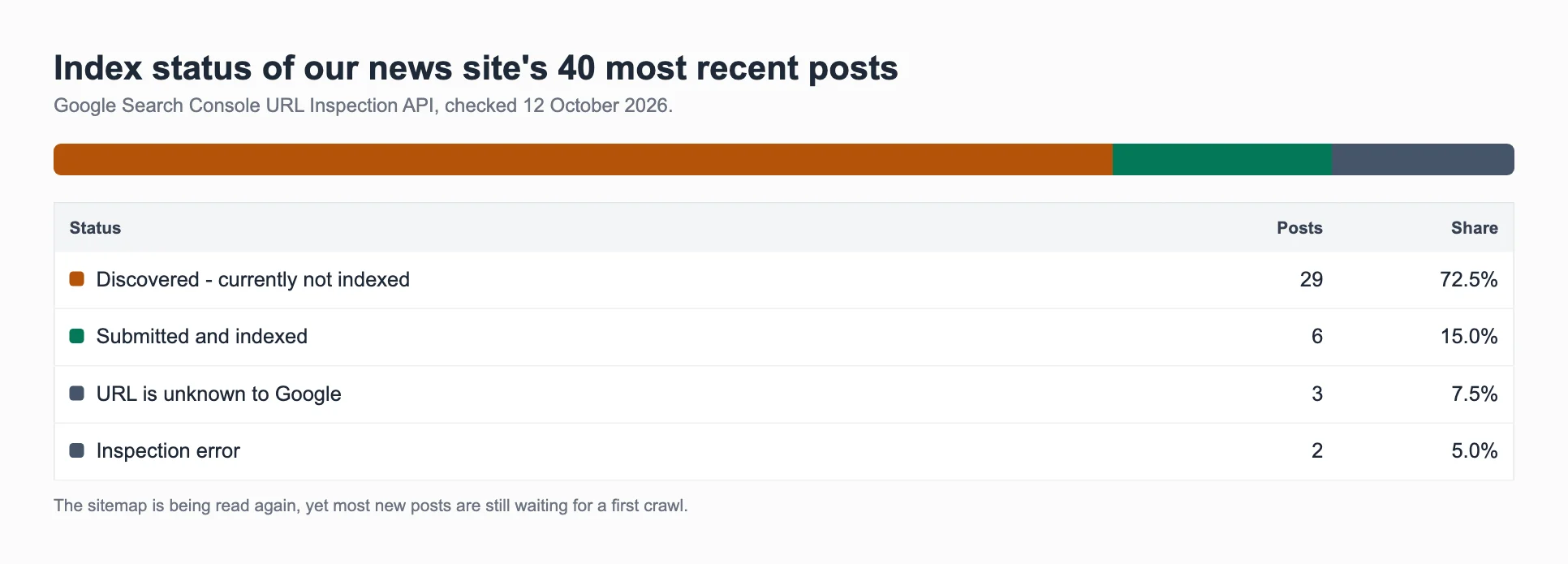
Resubmitting got the sitemap read again, but crawling stayed slow. When I checked the same site on 12 October 2026, 29 of its 40 newest posts were still “Discovered – currently not indexed.” Google knows they exist. It just isn’t in a hurry to fetch them.
Mueller explained the mechanism in episode 114. When crawl demand is low, Google may “skip the sitemap file because we got enough already.” If the site’s quality improves, Google will start using the sitemap again. In the same episode he gave two reasons a valid sitemap can show “Couldn’t fetch”: Google was too busy with the site, or it didn’t need more from it.
Two sitemap details matter more than people think:
- lastmod has to be honest. Google’s sitemap documentation says it uses lastmod only if it is “consistently and verifiably” accurate. Mueller added that if you give every URL today’s date, “we will realize that it doesn’t make much sense.”
- List canonical URLs only. Parameter URLs, redirects and noindexed pages in a sitemap send mixed signals.
Fixing “Crawled – currently not indexed”
Once the technical checks are clean, crawled-not-indexed pages almost always come down to one of three things.
Duplication. Gary Illyes said in a 2024 interview that “dupe elimination is one of those things” behind this status. On WordPress, look for “-2” slugs from repeated imports and tag pages that repeat category pages. On Shopify, look for the same product reachable under several collection paths.
Pages that add nothing new. In episode 112, Splitt said the status can tell you, as the owner, “this content isn’t as valuable as I thought it is because other people are covering the same thing.” Posts that repeat what dozens of other pages already say, whoever or whatever wrote them, are the classic case. Mueller said it directly in a 2022 office hours session: “Which sometimes means making less content and making better content.”
Content that’s hard to find on the page. Mueller also mentioned text that is “almost hidden away—hidden behind ads, hidden behind interstitials.” Product descriptions pushed below a long stack of app widgets and pop-ups are the Shopify version of this.
For a site with dozens of these pages, I rewrite each one with something the current top results don’t have and link it from pages that are already indexed. True duplicates get merged into the stronger page.
Fixing “Discovered – currently not indexed”
Pages Google hasn’t even fetched need a reason to be fetched. Internal links are the strongest one you control. In a 2024 video, Splitt’s advice was to “make sure your internal linking relates this content to other parts of your existing content.” Mueller has said internal linking is how Google understands “what you would consider to be important on a website.”
In practice that means linking new posts from related older posts that are already indexed, not only from the blog index page. On Shopify, it means linking products from collection copy and from relevant articles, not only from the product grid.
Server health is the other lever. Splitt also said to make sure “your server isn’t giving Googlebot signals that it is overwhelmed.” Slow responses and 5xx errors in the Crawl Stats report are worth fixing before anything else on large catalogs.
What doesn’t help
- Hammering “Request indexing.” Google’s recrawl page says requesting a recrawl multiple times for the same URL “won’t get it crawled any faster,” and there is a daily limit.
- Third-party “instant indexing” tools. Google’s Indexing API documentation says it “can only be used” for pages with JobPosting or BroadcastEvent markup, and every submission goes through spam detection.
- Trusting site: searches or index-checker tools. Mueller called Search Console “the source of truth.” One link vendor’s test found a checker tool reported 75.8% of its backlinks indexed when URL Inspection showed 98.2%.
- Panicking over one bad day. On 9 September 2026 Mueller confirmed a reporting glitch that briefly showed indexed pages as not indexed. He called it “a short blip that was resolved quickly in the night.”
How long it takes
Google’s help pages give a few anchors. New content “can take a few days” to be indexed. After you click Validate fix, “validation typically takes up to about two weeks.” Requested crawls take “anywhere from a few days to a few weeks.”
Quality-driven exclusions are slower. If Google has reduced crawling because of the site as a whole, individual pages won’t come back until enough of the site improves. On sitemaps, Mueller said Google goes back to using the file “if we see over time that the quality of the website improves significantly.” In my experience that takes weeks to a few months, and some pages never return.
A short checklist
- Export the affected URLs from the Page indexing report and group them by template.
- Live-test two or three URLs per group in URL Inspection.
- Fix any blocking, noindex, canonical or soft-error problem, then click Validate fix for that group. Mueller said Google tests a sample of the URLs you mark as fixed, and “if we see that they’re actually fixed, then in most cases, we will trigger a faster recrawl of the other pages.”
- Check the sitemap status, lastmod values and that only canonical URLs are listed.
- Merge or rewrite thin and duplicate pages; link the keepers from indexed pages.
- Re-check the report after two weeks, then monthly.
Why is my website not indexed by Google at all?
If almost nothing from a site is indexed and there’s no technical block, Mueller’s answer in July 2025 was blunt: “often that’s a sign that our systems aren’t convinced about the site overall.” He added one exception: “If you’ve recently moved to this domain, sometimes it takes time to settle down.”
For a quick self-check first, see how to check whether Google indexed your content.
If you would rather have someone go through this on your site, our SEO audit starts with exactly these checks.